Viewers for fragment analysis data files
Peak Scanner Software
Free software provided by Applied Biosystems for Windows. This software performs DNA fragment analysis; separates a mixture of DNA fragments according to their sizes, provide a profile of the separation, and precisely calculate the sizes of the fragments. The software enables you to view, edit, analyse, print, and export fragment analysis data generated using the Applied Biosystems Genetic Analyzers. All editing and analysis data is written to the .fsa file.
GeneMapper Software
Contact Applied Biosystems for GeneMapper software information and prices.
Experimental Design
A good source of information on experimental design, primer labelling, optimising PCR , multiplexing reactions, fragment analysis applications and troubleshooting, is the Applied Biosystems Genescan Reference Guide - ABI Prism 310 Genetic Analyser, 1997 (Part # 4303189B).
Note: The information presented in this section has been sourced from the Genescan Reference Guide.
Multiplexing Reactions
Using the 3130xl and the Applied Biosystems GeneMapper system, you can label different DNA fragments with up to four different coloured fluorescent dyes (G5/DS33 - 6-FAM, VIC, NED or PET). To exploit the potential for increased throughput using this system, you may want to multiplex electrophoresis by co-loading products of multiple PCR reactions in the same capillary injection or depending upon your application, you may choose to multiplex the PCR.
Co-electrophoresis
- Use a combination of dyes from Applied Biosystems Dye Set G5, DS31 or DS30. (LIZ or ROX is reserved for our internal standard).
- Use different dye labels for PCR reactions with overlapping product size.
- Pool PCR products in order to get similar fluorescent intensities for all products. The intensity of emitted fluoresence is different for each dye, 6-FAM, VIC >NED > PET > LIZ, so use a greater amount of PCR product labelled with dyes of low emission intensity than those labelled with dyes of high emission intensity.
Multiplexing PCR
- Combine more than one pair of primers in the same PCR reaction tube.
- Do not multiplex primers with similar product lengths labelled with similar dyes
- For microsatellite applications, do not multiplex same dye-labelled primers for loci with overlapping allele size ranges.
- Check for compatibility between the primers.
- Test for successful co-amplification between primer pairs.
Sizing
When designing your primers ensure that the fragments produced are >75 bp and < 490bp (for LIZ500) or < 580bp (for LIZ600). It is critical to the sizing method employed by the GeneMapper software that there are at least two size standard fragments larger than your largest unknown fragment.
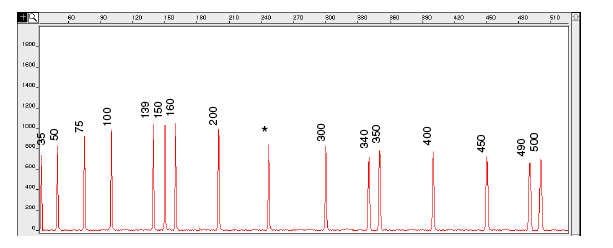
Figure 5-5: Electropherogram of the GeneScan-500 size standard run under denaturing conditions on the ABI PRISM 310 Genetic Analyser. Fragments were run using the POP-4 polymer at 60°C.
IMPORTANT An * for the 250-bp peak denotes a peak resulting from abnormal migration of double strands that did not completely separate under denaturing conditions. Do not use this peak to size samples. This peak shows variably smaller values than the actual size of the fragments.
Control DNA
It is recommended that you analyse at least one control DNA sample in every PCR run.
Control DNA :
- Serves as a positive control for troubleshooting problems with the PCR amplification
- Allows you to monitor sizing precision
- Enables you to correlate the fragment sizes that you obtain with the fragment sizes obtained by others.
Sample Preparation
It is the responsibility of the customer to optimise the concentration of reaction products in the sample. You will almost always need to dilute PCR amplification products before sending to the GUDSF for analysis. Typically, the required dilution lies in the range from 1:3 – 1:80 ( PCR product:distilled H2O).
Too much signal is the most common problem. For optimal results, the fluorescent signal should be between 150 – 6000 RFUs . Above this range, the instrument cannot measure the true value of the signal and therefore cannot apply the matrix correctly. This results in artefact “pull-up” peaks that can appear in other colours. Artefact peaks can corrupt both the automated size calling and the analysis of co-loaded samples.
If you intend to pool PCR products, it is important to pool PCR products together at the correct ratios in order to get similar fluorescent intensities across all fragments in the pool. The fluorescent dyes are detected with different efficiencies, therefore the amount of each dye-labelled product in the pool will require adjustment to ensure even detection.
A good way to proceed is to test a few combinations of pooled PCR reactions to determine the pooling ratio that will provide similar fluorescent intensities across all the pooled fragments. Then carry out a series of dilutions on the pooled reactions in order to determine the optimal fluorescence for running on the 3130xl.
Send in 1 µL of each dilution series to the GUDSF for capillary electrophoresis and sizing. After determining the optimal pooling ratio and/or dilution ratio, you can then use the same dilutions for subsequent analyses, as PCR yields should be relatively consistent.